
Before you start
Set up WoW (keybinds)
ForeverCast presses keys for you, so WoW needs to know what those keys do. Two are required, two are optional.
Cast, Interact, Apply Lure, Logout, Bag and the Toggle Hotkey must all be separate keys. In particular, Interact must not be the same key as Cast, or ForeverCast will recast instead of looting.
| In WoW | In ForeverCast | |
|---|---|---|
| Fishing on an action bar slot | Cast Key | Required |
| Interact With Target | Interact Key/Button | Required |
| Apply Lure (Keybindings → Other) | Apply Lure Key | Optional |
/logout macro on an action bar slot | Logout Key | Optional |
1. Put Fishing on your action bar
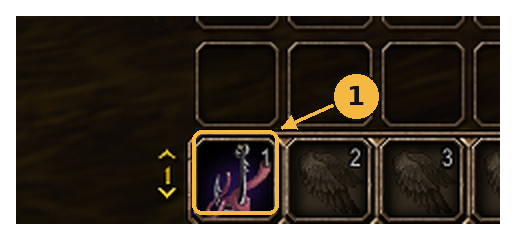
- Fishing in an action bar slotOpen your spellbook (P), drag Fishing onto an action bar slot and note the key shown on that slot. Enter that key as Cast Key in ForeverCast.
ForeverCast doesn't equip the fishing pole for you. Put it on before you start.
2. Bind "Interact With Target"
Open Options → Controls (the keybinding list, under Targeting in most layouts).
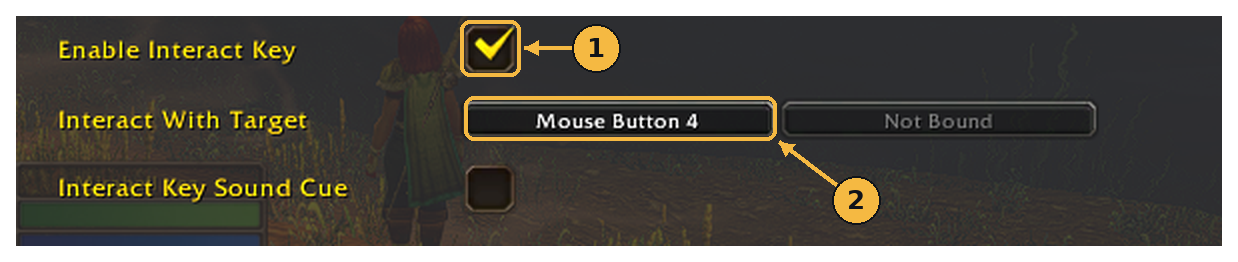
- Enable Interact KeyTick this box. Without it, the Interact With Target binding does nothing.
- Interact With TargetClick the first box and press a key you don't use for anything else, for example F or a side mouse button. It must be a different key from your Cast Key. Enter the same key as Interact Key/Button in ForeverCast.
Then the Cast and Interact keys must be keyboard keys, not mouse buttons. Mouse buttons can't be sent to a window in the background.
3. Lure key (optional)
- Check the addon is onOn the character select screen, click AddOns and make sure FCBeacon is enabled.
- Find the bindingIn game, open Options → Keybindings and scroll all the way down to the Other section.
- Bind itClick the first box next to Apply Lure and press a key, e.g. V.
- Tell ForeverCastEnter the same key as Apply Lure Key in the settings. Leave it empty if you don't want lures applied.

- OtherFCBeacon's binding is listed under Other, at the bottom of the keybinding list, not under AddOns.
- Apply LureYour key goes in the first box. Use a key you don't already use for something else.
When your lure runs out, ForeverCast presses that key before the next cast and the addon uses the best lure in your bags. If you have no lures at all, it gives up after two tries and stops checking for the rest of the session.
WoW only accepts addon button keybinds while it's the active window. In Background Fishing, put a /use macro for your lure on a normal action bar slot instead.
4. Logout macro (optional)
Only needed if you want ForeverCast to log you out when a session limit is reached.
- Make the macroType
/macro, click New, name it anything, and type/logoutas the only line. - Put it on a slotDrag it onto an action bar slot that has a keyboard key.
- Tell ForeverCastEnter that key as Logout Key under Session Limits.
5. Sound settings
ForeverCast hears the splash through WoW's own audio, so:
- Enable Sound must be on, and the Master and Sound Effects volumes must not be at 0.
- Turn on Sound in Background (Options → Audio). Without it, WoW goes silent when you click another window and ForeverCast stops hearing splashes.
- Music and ambient sounds can stay on. If they cause false bites, lower Ambience or raise the Audio Multiplier a little.